How to start using AWS — from signing up as an individual to enterprise-scale deployments, plus the foundational security model you must understand.
Signing Up for AWS (Individual/Developer)
Step-by-step:
- Go to aws.amazon.com → Click Create Account
- Enter email address and choose an account name
- Verify email with 6-digit code
- Set a strong root password
- Select account type: Personal or Business (same features, just contact info differs)
- Add payment method (credit/debit card required — AWS does a $1 temporary hold for verification)
- Verify identity via SMS or voice call
- Choose Basic Support (Free) plan
- Wait a few hours for full verification, then access the AWS Console
Tip: Use an email you control long-term. For business accounts, use a distribution list (e.g.,
aws-admins[at]company.com) for continuity.
AWS Free Tier
AWS offers free usage to help you learn and experiment:
For Accounts Created After July 15, 2025
| Plan | What You Get |
|---|---|
| Free Plan | $100 credits on signup + $100 more for completing onboarding activities. Valid for 6 months or until credits are exhausted. |
| Paid Plan | Pay-as-you-go access to all AWS services |
Note on Free Services: ~30-40 services are “Always Free” (perpetual free tier). Additional services offer 12-month free trials for new accounts.
Always Free Services (No Expiry)
| Service | Free Limit |
|---|---|
| Lambda | 1M invocations + 400K GB-seconds/month |
| S3 | 5 GB standard storage |
| DynamoDB | 25 GB storage |
| CloudFront | 1 TB data transfer + 10M requests |
| SNS | 1M publishes |
| EC2 | 750 free IPv4 address-hours/month |
Warning: Services beyond free limits are billed. Set up Billing Alerts immediately to avoid surprises.
Enterprise vs Individual Signup
There’s no technical difference between “Personal” and “Business” accounts at signup — both get the same features. The real difference lies in how enterprises structure their AWS presence.
Individual/Small Team
| Aspect | Approach |
|---|---|
| Account structure | Single standalone account |
| Management | Direct console access |
| Billing | Single payment method |
| Best for | Learning, side projects, small apps |
Enterprise Approach
| Aspect | Approach |
|---|---|
| Account structure | Multiple accounts managed by AWS Organizations |
| Management | Centralized governance with Service Control Policies (SCPs) |
| Billing | Consolidated billing across all accounts |
| Identity | AWS IAM Identity Center for SSO across accounts |
| Best for | Large teams, compliance requirements, production workloads |
Why Enterprises Use Multiple Accounts
- Security isolation: Compromise in one account doesn’t affect others
- Blast radius: Limits impact of misconfigurations
- Compliance: Different policies for different environments (dev/staging/prod)
- Cost allocation: Track spending by team, project, or business unit
- Service quotas: Quotas are per-account, so multiple accounts = more headroom
AWS Organizations is free to use. It provides a Management Account that oversees all Member Accounts organized into Organizational Units (OUs).
Shared Responsibility Model
The most important security concept in AWS. Memorize this for the exam.
The Core Principle
| AWS Responsibility | Your Responsibility |
|---|---|
| Security OF the cloud | Security IN the cloud |
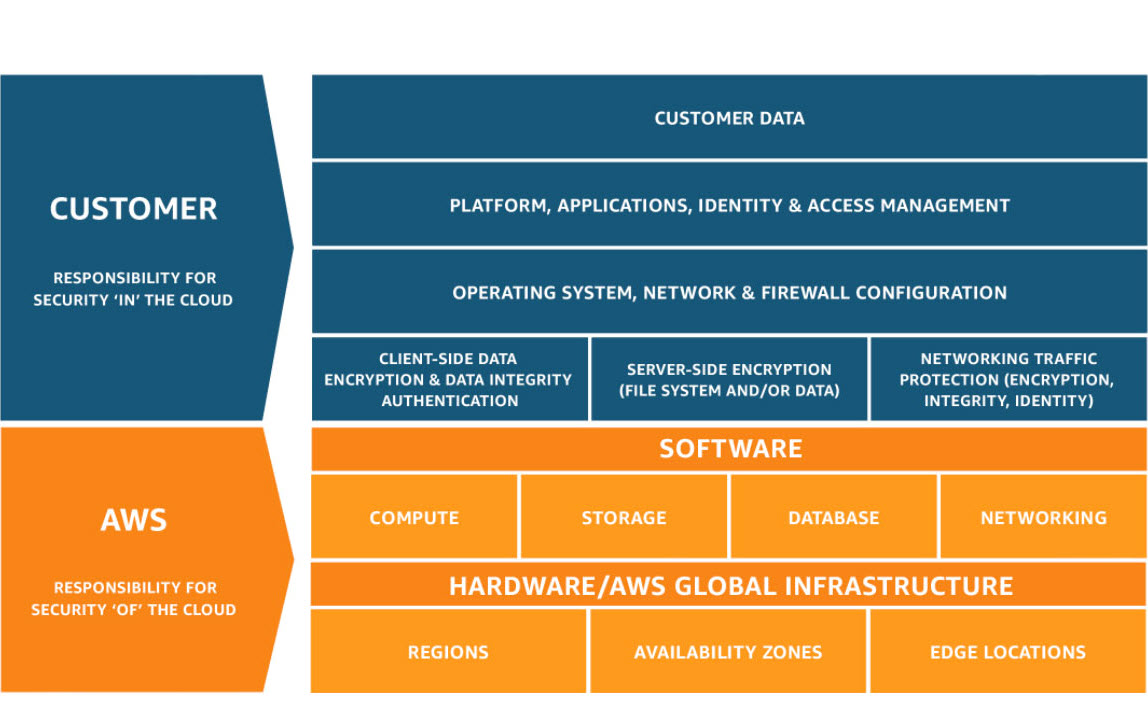 Source: AWS Shared Responsibility Model
What AWS Secures (Security OF the Cloud)
- Physical data centers (facilities, power, cooling, cabling)
- Hardware and global network infrastructure
- Host operating system and virtualization layer
- Managed service infrastructure (e.g., RDS engine patching)
What You Secure (Security IN the Cloud)
- Your data: Encryption, classification, access controls
- Guest OS: Patching, hardening, updates (for EC2)
- Applications: Code security, authentication, authorization
- Network configuration: Security groups, NACLs, VPC design
- IAM: Users, roles, permissions, MFA enforcement
- Encryption: Choosing to encrypt data at rest and in transit
Responsibility Varies by Service Type
| Service Type | Your Responsibility Level |
|---|---|
| IaaS (EC2) | High — you manage OS, apps, patching, networking |
| PaaS (Elastic Beanstalk, RDS) | Medium — AWS manages infrastructure, you manage app/data |
| SaaS (S3, DynamoDB, Lambda) | Lower — AWS manages most, you manage data and access |
Key Exam Point: Responsibility shifts based on the service. With Lambda, you don’t manage servers at all. With EC2, you manage everything above the hypervisor.
TL;DR
- Signup is the same for individuals and businesses — just email, payment, and verification.
- Free Tier (post-July 2025) gives $200 in credits + Always Free services with monthly limits.
- Enterprises use AWS Organizations for multi-account governance, SCPs, consolidated billing, and SSO.
- Shared Responsibility Model: AWS secures the cloud infrastructure; you secure what you put in it. Responsibility level depends on whether you’re using IaaS, PaaS, or SaaS.
Resources
AWS Free Tier
Official page listing all free tier offerings and limits.AWS Organizations
Overview of multi-account management capabilities.AWS’s official explanation of security responsibilities.