How to choose the right machine type and boot image for Google Compute Engine VMs.
Note: Machine family examples below are current as of May 2026. Google Cloud adds new series often, so check the official machine type reference before standardizing on a production shape.
Machine Type Naming Convention
Machine type names follow a pattern:
n2-standard-4
│  │       │
│  │       └─ vCPU count (4 vCPUs)
│  └───────── Subfamily (standard = balanced CPU/memory)
└──────────── Family (n2 = 2nd gen general-purpose)
e2-micro
│ │
│ └─ Shared-core tier (micro, small, medium)
└──────── E2 family (cost-optimized)| Part | Meaning | Examples |
|---|---|---|
| Family | Generation and optimization target | e2, n2, n4, c4, m4, a4 |
| Subfamily | CPU-to-memory ratio within the family | standard, highcpu, highmem, mega |
| vCPU count | Number of virtual CPUs | 2, 4, 8, 16, 32, … |
| Shared-core | E2 shared-core tiers (fractional vCPU) | micro, small, medium |
Machine Families
| Family | Current Series Examples | Optimized For | Use Cases |
|---|---|---|---|
| General-purpose | E2, N1, N2, N2D, N4, N4D, N4A (Preview), C3, C3D, C4, C4A, C4D | Balanced price/performance, with newer C-series options for higher performance | Web servers, apps, small databases, dev/test, most production services |
| Compute-optimized | C2, C2D, H3, H4D | High CPU throughput and HPC-style workloads | Batch processing, gaming, HPC, encoding, tightly coupled compute |
| Memory-optimized | M1, M2, M3, M4, X4 | Large memory per VM | SAP HANA, in-memory databases, analytics, very large databases |
| Accelerator-optimized | A2, A3, A4, A4X, G2, G4 | GPU workloads | ML training/inference, rendering, video processing |
| Storage-optimized | Z3 | High local SSD throughput and IOPS | Databases, analytics, local scratch-heavy workloads |
Note: Machine series availability changes by region and zone. Always confirm that the exact series, GPU, CPU platform, or local SSD option exists in the target zone before designing around it.
General-Purpose Family (Most Common)
| Series | Highlights | Discount Notes | Best For |
|---|---|---|---|
| E2 | Cost-optimized. Includes shared-core tiers (e2-micro, e2-small, e2-medium). | No sustained-use discounts; low on-demand pricing and eligible CUD options are the main savings path. | Learning, dev/test, small apps, free tier |
| N4 / N4D / N4A | Newer general-purpose series with improved price/performance. N4 is Intel, N4D is AMD, and N4A is Arm-based but currently Preview. | Check current pricing and region availability; newer series may not have the same discount model as N1/N2. | New production workloads where GA; evaluation workloads for Preview series |
| N2 / N2D | Mature general-purpose Intel/AMD options with broad availability and high max vCPU counts. | Eligible for sustained-use discounts and committed-use discounts. | Production web apps, databases, general compute |
| C3 / C3D / C4 / C4A / C4D | Higher-performance general-purpose options with newer CPU platforms and stronger networking/storage options. | Verify exact series pricing, discount support, and zone availability. | Performance-sensitive services, databases, network-heavy apps |
| N1 | Older generation with broad legacy compatibility. | Eligible for sustained-use discounts, but usually not the first choice for new general-purpose workloads. | Legacy workloads or compatibility-driven choices |
Rule of thumb: Start with E2 for learning and small workloads. For production, check whether N4/N4D is available in your zone; otherwise N2/N2D remains a safe baseline. Treat Preview series such as N4A as evaluation-only unless your organization accepts Pre-GA constraints. Use C3/C4 families when performance matters more than lowest cost.
Spot VMs and Preemptible VMs
For workloads that can tolerate interruption, GCE offers short-lived VMs at steep discounts:
| Aspect | Spot VMs | Preemptible VMs |
|---|---|---|
| Discount | Up to 91% off on-demand | Up to 91% off on-demand |
| Max runtime | No fixed limit (runs until reclaimed) | 24 hours max |
| Termination | 30-second warning via metadata | 30-second warning via metadata |
| SLA | No SLA | No SLA |
| Availability | Best-effort, depends on spare capacity | Best-effort |
| Recommendation | Preferred for new workloads | Legacy option, use Spot instead |
Good candidates for Spot VMs: Batch jobs, CI/CD builds, ML training (with checkpointing), data processing, rendering.
Bad candidates for Spot VMs: Databases, web servers serving live traffic, any workload that can’t recover from sudden termination.
Custom Machine Types
If no predefined machine type fits your workload, you can create a custom machine type with exact vCPU and memory values:
gcloud compute instances create my-vm \
  --machine-type=custom-6-24576 \
  --zone=us-central1-a
The N1 format is custom-{vCPUs}-{memory-in-MB}. So custom-6-24576 = 6 vCPUs, 24 GB RAM.
- Newer supported series use series-specific names such as
n2-custom-4-16384,n2d-custom-4-16384, ore2-custom-4-16384 - Supported vCPU and memory ranges depend on the series
- Custom machine types usually cost more than comparable predefined shapes, but they can still be cheaper when they avoid overprovisioning
- Available only on supported general-purpose series; check current series docs before standardizing on custom shapes
Custom machine types are worth it when your workload has specific memory requirements that don’t match any predefined type. For most cases, a predefined type is simpler and cheaper.
Choosing the Right Machine Type
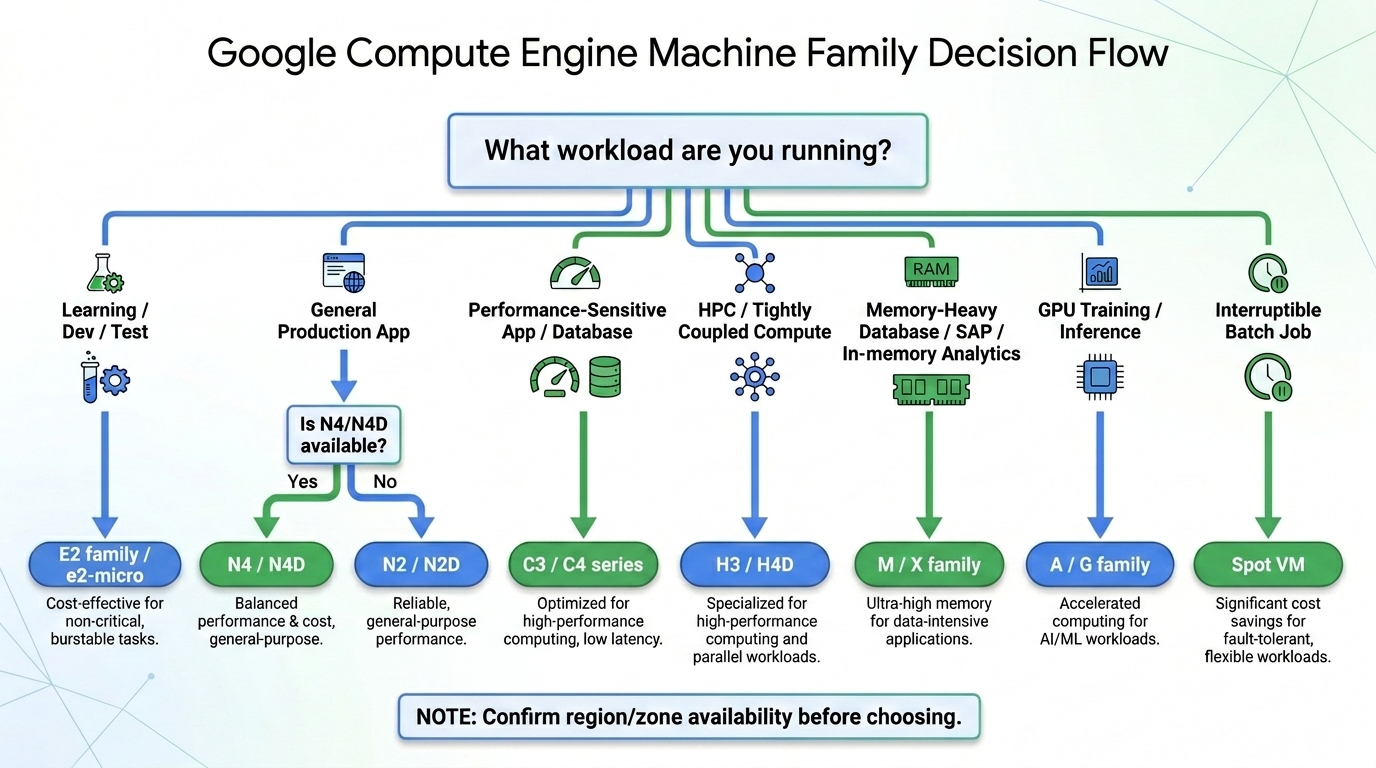
| Scenario | Recommended Family | Example Type |
|---|---|---|
| Learning / free tier | E2 family / e2-micro | e2-micro |
| Small web server | E2 | e2-medium |
| New production web app | N4 or N2 | n4-standard-4 or n2-standard-4 |
| Cost-sensitive production | N2D | n2d-standard-4 |
| High-performance computing | H3/H4D or C-series | h3-standard-88 or a current C-series option |
| In-memory database (Redis, Memcached) | M3 | m3-highmem-8 |
| SAP HANA | M3 | m3-megamem-64 (certified sizes) |
| ML training (GPU) | A3/A4 family | Example depends on GPU generation and regional availability |
| ML inference (GPU) | G2/G4 family | Example depends on GPU generation and regional availability |
| Batch processing (interruptible) | Spot VM on E2/N2 | Any, with --provisioning-model=SPOT |
Images
An image is a boot disk template. When you create a VM, you pick an image that determines the operating system and initial software on the boot disk.
Public Images
| OS | Common Image Families | Cost Notes |
|---|---|---|
| Debian | debian-12, earlier supported Debian families | Free |
| Ubuntu | 22.04 LTS, 24.04 LTS, Pro variants | Ubuntu LTS is free; Pro images can add licensing cost |
| Rocky Linux | 8, 9 | Free |
| CentOS Stream | 9 | Free; avoid old CentOS Stream 8 for new workloads |
| Red Hat Enterprise Linux | Current supported RHEL families | Premium unless using an approved bring-your-own-subscription flow |
| SUSE | SLES families | Premium |
| Windows Server | Current supported Windows Server families | Premium licensing is included in VM cost |
| Fedora CoreOS | Stable | Free |
| FreeBSD | Current supported FreeBSD families | Free |
Tip: For most Linux VMs, Debian 12 or Ubuntu 24.04 LTS are safe defaults. Both are widely supported. Use the
image-familyflag to get the latest patched image in that family.
Custom Images vs Image Families
| Concept | Description |
|---|---|
| Public image | Provided by Google or OS vendor. Use for fresh VMs. |
| Image family | A pointer to the latest image in a series (e.g., debian-12 always points to the latest Debian 12 patch). |
| Custom image | You create it from a VM’s boot disk. Use for golden images with pre-installed software. |
| Machine image | Captures the full VM configuration (disks, network, metadata). More complete than a custom image. |
Snapshots vs Images
| Aspect | Snapshot | Image |
|---|---|---|
| Purpose | Point-in-time backup of a disk | Boot disk template for new VMs |
| Can create VM from it? | Yes, by creating a disk from the snapshot first | Yes, directly |
| Incremental | Yes (only changed blocks stored) | No (full copy) |
| Use case | Backup and disaster recovery | Standardized VM creation |
| Cross-region | Yes (can share across regions) | Yes (can share across regions) |
Shielded VMs
Shielded VMs provide verifiable integrity of your VM’s boot stack:
| Feature | What It Does |
|---|---|
| Secure Boot | Only boots with signed boot loaders and kernels. Prevents rootkits and boot-level malware. |
| vTPM | Virtual Trusted Platform Module. Measures boot integrity and stores measurements for verification. |
| Measured Boot | Each boot stage is measured and recorded. You can verify the VM booted with expected software. |
| Integrity monitoring | Cloud Monitoring reports when a VM’s boot measurements change from the baseline. |
Most public images support Shielded VMs. You can enable it during VM creation:
gcloud compute instances create my-secure-vm \
  --shielded-secure-boot \
  --shielded-vtpm \
--shielded-integrity-monitoringNote: Shielded VMs are available on most machine types. Confidential VMs (which encrypt data in use) are available on specific machine types with AMD SEV or Intel TDX.
TL;DR
- Machine type naming:
{family}-{subfamily}-{vcpus}(e.g.,n2-standard-4). E2 has shared-core tiers (micro,small,medium). - Start with E2 for dev/test. For production, evaluate N4/N4D where available, then N2/N2D as a mature baseline. Use C/H-series for performance-heavy, M/X-series for memory-heavy, and A/G-series for GPU workloads.
- Spot VMs give up to 91% discount for interruptible workloads. Preferred over legacy preemptible VMs.
- Custom machine types let you specify exact vCPU/memory on supported general-purpose series. They can cost more per unit, but can still reduce total cost by avoiding overprovisioning.
- Images are boot disk templates. Use
image-family(e.g.,debian-12) to get the latest patched image. Debian and Ubuntu LTS images are common free defaults. - Shielded VMs add Secure Boot, vTPM, and integrity monitoring for boot-level security.
Resources
Machine Types Reference Complete list of all machine types with vCPU, memory, and pricing details.
General-Purpose Machines Current N, C, E, Tau, and Arm-based general-purpose series.
Compute-Optimized Machines Current H and C2 compute-optimized series.
Accelerator-Optimized Machines Current A and G GPU-backed series.
Public Images Reference All available public images, versions, and image families.
Shielded VM Documentation Details on Secure Boot, vTPM, and integrity monitoring.
Google Compute Engine Overview of GCE features and architecture.
Creating Your First VM Step-by-step guide to launching a VM on GCP.