Google Cloud global infrastructure hierarchy explained: regions, zones, and the underlying data centers that support them.
Why This Structure Exists
Google Cloud exposes infrastructure to customers mainly as Region -> Zone. Data centers are the underlying physical implementation, but you usually choose regions and zones, not individual data centers.
- Fault isolation: Zones are isolated from each other, so a failure in one zone does not take down the whole region.
- High availability: You can run active workloads across multiple zones within a region with low latency between them.
- Data residency and governance: You choose a region based on legal, regulatory, and business requirements.
- Disaster recovery design: You can do multi-zone (within a region) and multi-region (across regions) patterns intentionally.
- Operational scale: Google can grow capacity by adding zones and data centers while keeping the same region and zone abstraction.
Core Definitions
- A Region is an independent geographic area, like
us-central1in Iowa oreurope-west1in Belgium. - A Zone is a deployment area and failure domain within a region.
- A Data center is the physical facility underneath the abstraction. A zone can map to one or more data centers, and some newer regions are still expanding their physical data center footprint.
Key Insight: Region and zone are the units you design with. Data centers matter for physical resilience, but Google abstracts them away from normal customer deployment decisions.
Failure Scope
- Regions protect against broad geographic failures. If one region becomes unavailable, workloads designed to run in another region can continue serving traffic.
- Zones protect against localized infrastructure failures inside a region. Google designs zones to reduce correlated failures from power, cooling, or networking issues, but you still need to deploy across zones for high availability.
Hierarchy
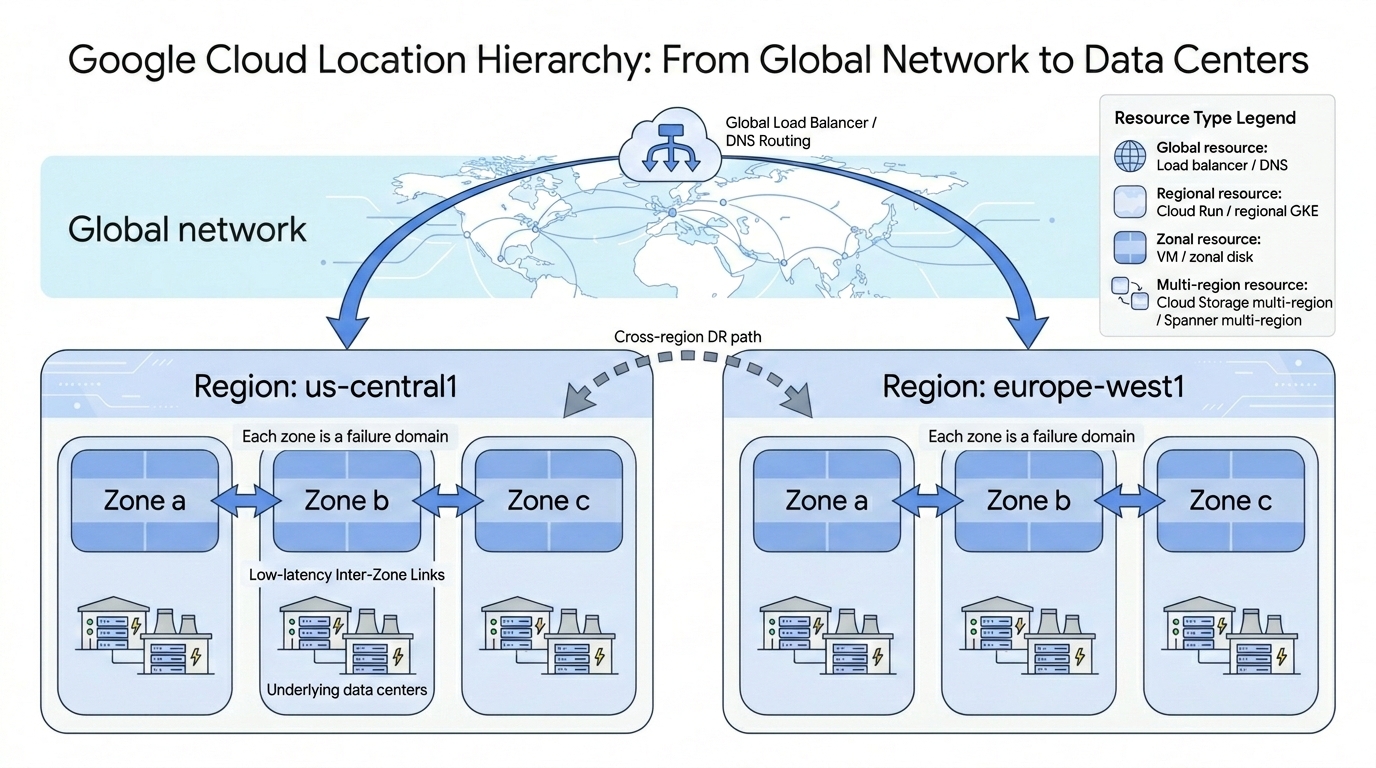
Current GCP Scale (As of May 2026)
From the official Google Cloud locations page:
- 43 regions
- 130 zones
- 200+ edge network locations for services like Cloud CDN and global load balancing
- Connected by Google’s private fiber-optic backbone spanning millions of kilometers
These numbers change as Google launches new infrastructure. Re-check the official locations page before relying on them in production docs.
Zones Per Region
Google intends to offer a minimum of three availability zones in every general-purpose region. Some regions have more depending on demand and capacity.
Note: Google documents that a few regions, such as Stockholm, Mexico, Osaka, and Montreal, have three zones housed in one or two physical data centers while they expand to at least three physical data centers.
Zone Naming Convention
Zone names follow the pattern <region>-<letter>:
| Example | Breakdown |
|---|---|
us-central1-a | Region: us-central1, Zone: a |
europe-west1-b | Region: europe-west1, Zone: b |
asia-northeast1-c | Region: asia-northeast1, Zone: c |
Note: Unlike AWS Availability Zone names, Google Cloud zone names are not documented as randomized per project. Treat
us-central1-aas a concrete Google Cloud zone name, while still designing for zone failure.
Resource Location Scope
Not every Google Cloud resource is placed at the same level of the hierarchy.
| Scope | What It Means | Examples |
|---|---|---|
| Global | Resource is not tied to one region or zone | IAM policies, VPC networks, firewall rules, global external load balancers, Cloud DNS |
| Multi-region | Google manages the service across multiple regions | Cloud Storage multi-region buckets, Spanner multi-region instances, Firestore multi-region locations |
| Regional | Resource is tied to one region and may be spread across zones | Cloud Run service, regional managed instance group, regional GKE cluster, Cloud SQL HA instance |
| Zonal | Resource is tied to one zone | Compute Engine VM, zonal persistent disk, zonal GKE cluster |
Tip: Check each service’s location model before designing resilience. “Regional” does not always mean “automatically highly available” in the same way for every product.
AI Zones
Google Cloud also has specialized AI zones in select regions. These zones provide high-capacity GPU and TPU resources for AI and ML training or inference.
AI zones matter because accelerator availability is more constrained than general compute. If a workload requires a specific GPU or TPU family, choose the region and zone based on accelerator availability, not only user latency.
Major Regions by Continent
| Region ID | Location | Zones | Continent |
|---|---|---|---|
us-central1 | Iowa | 4 | North America |
us-east1 | South Carolina | 3 | North America |
us-east4 | Northern Virginia | 4 | North America |
us-east5 | Columbus | 3 | North America |
us-west1 | Oregon | 3 | North America |
us-west4 | Las Vegas | 3 | North America |
northamerica-northeast1 | Montreal | 3 | North America |
europe-west1 | Belgium | 3 | Europe |
europe-west2 | London | 3 | Europe |
europe-west3 | Frankfurt | 3 | Europe |
europe-west4 | Netherlands | 3 | Europe |
europe-west6 | Zurich | 3 | Europe |
europe-west9 | Paris | 3 | Europe |
asia-east1 | Taiwan | 3 | Asia Pacific |
asia-northeast1 | Tokyo | 3 | Asia Pacific |
asia-southeast1 | Singapore | 3 | Asia Pacific |
asia-south1 | Mumbai | 3 | Asia Pacific |
australia-southeast1 | Sydney | 3 | Oceania |
southamerica-east1 | São Paulo | 3 | South America |
me-west1 | Tel Aviv | 3 | Middle East |
africa-south1 | Johannesburg | 3 | Africa |
This is not a complete list. Google Cloud has 43 regions total. See cloud.google.com/about/locations for the full list with zone counts.
Choosing the Right Region
| Factor | What to Consider |
|---|---|
| Latency | Pick a region close to your users. Google provides a Region Picker tool to test latency from different locations. |
| Data residency | Legal and regulatory requirements (GDPR, data sovereignty laws) may require data to stay in specific countries or regions. |
| Service availability | Not all GCP services are available in every region. Check the service availability page before committing to a region. |
| Pricing | Prices vary by region. Compute, storage, and egress can cost more in some regions. Check the pricing page for your target services. |
| Carbon footprint | Google publishes carbon data per region. Some regions run on cleaner energy grids. Relevant if your organization tracks sustainability metrics. |
Tip: For learning and experimentation, use
us-central1(Iowa) oreurope-west1(Belgium). These tend to have the widest service availability and are often the cheapest for common services.
Why Use Multiple Regions
- Disaster recovery: If an entire region goes down (rare but possible), workloads in another region stay up. Cross-region failover is a standard DR pattern.
- Latency for global users: Users in Asia hitting a US region experience higher latency. Deploying in
asia-northeast1(Tokyo) alongsideus-central1(Iowa) reduces round-trip time for both audiences. - Data residency compliance: Some regulations require data to stay in a specific country, region, or jurisdiction. Use specific regional deployments or approved multi-region locations based on the exact requirement.
- Key tools for multi-region: Global external Application Load Balancing, Cloud DNS, Cloud CDN, global VPC networks with regional subnets, Spanner multi-region instances, Cloud Storage multi-region buckets, and database replicas.
Common Misconceptions
| Misconception | Reality |
|---|---|
| Regions are only for large enterprises | Any cloud user can deploy globally. A startup can run workloads in multiple regions with a few clicks. |
| All regions cost the same | Pricing varies by region due to local taxes, energy costs, and operational expenses. |
| One zone is enough for high availability | Zones can and do fail. Multi-zone deployment is the baseline for production workloads. |
| All regions have the same number of zones | Zone count varies by region (typically 3-6 depending on demand and capacity). |
| Each zone is a single data center | A zone can contain multiple physical data centers. |
| Multi-region always solves data residency | It depends on the legal requirement and the service location. Multi-region can help availability but can violate strict data residency rules if data is replicated outside the allowed location. |
Quick Scenario Guide
| Scenario | Best Practice |
|---|---|
| High availability within a single region | Deploy across multiple zones |
| Global SaaS app with users worldwide | Deploy across multiple regions |
| Survive a data center failure | Distribute across zones |
| Survive an entire city or regional outage | Distribute across regions |
| Meet data residency laws | Choose the specific compliant region |
Design Implications
| Pattern | Resilience | Cost | Use Case |
|---|---|---|---|
| Single-zone | Lowest | Lowest | Development, testing, non-critical workloads |
| Multi-zone | High | Moderate | Standard production baseline for critical workloads inside one region. Behavior is service-specific. |
| Multi-region | Highest | Highest | Global applications, strict DR requirements, compliance needs across geographies |
How this looks in common services:
| Service | Location Behavior |
|---|---|
| Cloud Run services | Regional services; Google automatically replicates services across multiple zones in the selected region. |
| GKE | Autopilot clusters are regional. Standard clusters can be zonal or regional; use regional clusters for production availability. |
| Cloud SQL | A basic instance is not automatically multi-zone. Enable high availability to get a regional configuration with standby capacity. |
| Compute Engine | VMs are zonal. Use regional managed instance groups or your own multi-zone deployment pattern for HA. |
Key Insight: Multi-zone is a design pattern, not a universal default. Managed services differ in how much redundancy they provide automatically.
Deployment Patterns
Single-zone (lowest resilience):
flowchart LR
    Users["Users"] --> Region["Region: us-central1"]
    Region --> ZoneA["Zone a"]
    ZoneA --> App["App"]
Multi-zone (standard production baseline):
flowchart LR
    Users["Users"] --> RegionalLB["Regional load balancer"]
    RegionalLB --> ZoneA["Zone a<br/>App replica"]
    RegionalLB --> ZoneB["Zone b<br/>App replica"]
    RegionalLB --> ZoneC["Zone c<br/>App replica"]
Multi-region (highest resilience):
flowchart TB
    Users["Users"] --> LB["Global Load Balancer"]

    LB --> USRegion["Region: us-central1<br/>(Iowa)"]
    LB --> EURegion["Region: europe-west1<br/>(Belgium)"]

    USRegion --> USZoneA["Zone a<br/>App replica"]
    USRegion --> USZoneB["Zone b<br/>App replica"]

    EURegion --> EUZoneA["Zone a<br/>App replica"]
    EURegion --> EUZoneB["Zone b<br/>App replica"]
TL;DR
- Google Cloud organizes customer-facing infrastructure mainly as Region → Zone; data centers are the underlying physical implementation.
- Google intends to offer at least 3 zones in every general-purpose region for fault isolation.
- As of May 2026: 43 regions, 130 zones, 200+ edge locations.
- Choose a region based on latency, data residency, service availability, pricing, and carbon footprint.
- Use multiple regions for disaster recovery, global latency reduction, and compliance across geographies.
- Zone names are concrete Google Cloud locations, not randomized per project like AWS Availability Zone names.
Resources
Google Cloud Locations Official page with current region and zone counts, plus the Region Picker tool.
Regions and Zones Documentation Detailed reference for all regions, zones, and available machine types.
Geography and Regions Google Cloud’s official explanation of regions, zones, resource scopes, and data center caveats.
Cloud Run Resource Model Cloud Run service location and multi-zone replication behavior.
GKE Regional Clusters How regional GKE clusters replicate control plane and nodes across zones.
Cloud SQL High Availability How Cloud SQL HA differs from a basic single-zone instance.
VPC Networks Explains global VPC networks and regional subnets.
Network Service Tiers How Premium and Standard tier routing works across Google’s backbone.
Overview History, market position, and what makes Google Cloud unique.